
Data cleansing, also called data cleaning or data scrubbing, is the work of finding and fixing the problems in a set of records: typos, inconsistent formats, invalid values, missing pieces and duplicates. The goal isn't a perfect list. It's a consistent one, where every row says the same thing the same way — one format for phone numbers, one spelling of each state, one record per person — so the people and systems that rely on it can trust it.
Almost every business list needs it. A contact export that has passed through web forms, event sign-ups, imports and a few spreadsheets ends up with JOHN SMITH in one row and smith, john in the next, phone numbers written four different ways, and the same state spelled out, abbreviated and misspelled.
Why it matters
Messy data rarely fails where it lives. It fails downstream, in the tools and reports that depend on it:
- Deliverability. Mistyped and malformed email addresses bounce, and a high bounce rate damages your sender reputation, so even your good addresses start landing in spam.
- Duplicate outreach. When the same person is in a list twice, they get the same email twice, or two sales reps call the same lead.
- Wrong reports. Counts by state or country split across CA, Calif. and California, and duplicates inflate every total.
- Import failures. CRMs and email tools reject rows with invalid email addresses, dates in an unexpected format or values they don't recognize.
- Paying for bad records. Many CRMs and email platforms price by the number of contacts you store, so every duplicate and dead address costs you money.
What data cleansing involves
In practice, cleansing is a series of small, specific fixes, made field by field:
- Names: consistent capitalization (JOHN MCDONALD becomes John McDonald), first and last names in the right columns, and titles and suffixes written one way.
- Email addresses: lowercase, no stray spaces or punctuation, and obvious typos fixed, so jane@gmial.com becomes jane@gmail.com.
- Phone numbers: one format for the whole list, with a country code wherever the list spans countries.
- Addresses: street types written one way (St. or Street, not both), states and countries in one form, and postal codes in their proper shape.
- Dates: one format throughout. It matters more than it looks: 03/04/2025 is March 4 in the United States and 3 April in most of Europe.
- Format checks: making sure each value has the right shape for its field — an email address with one @ and a well-formed domain, a phone number with the right number of digits, a ZIP code that exists.
- Flagging: marking what can't be fixed automatically so that a person can look at it, rather than guessing.
Two related jobs usually travel with cleansing: deduplication, which finds the records that describe the same person or company, and enrichment, which fills in values that are missing.
A few rules of thumb
- Keep the original. Clean a copy, so you can always compare or start again.
- Change the format, never the meaning. A good fix turns 555.123.4567 into (555) 123-4567; it never invents a missing digit.
- Flag rather than guess. An address that can't be read should be marked for review, not rewritten into something plausible.
- Check before you import. Look at what changed, and at what was flagged, before the list goes into your CRM.
How Cleansable does it
Cleansable is a web app that cleanses CSV and Excel lists with rules, not AI, so the same file gives the same result every time. It detects 60+ field types — names, email addresses, phone numbers, street addresses, dates, company names, web addresses and identifiers such as VAT numbers — and applies 70+ cleaning operations to them, each with a before-and-after preview:
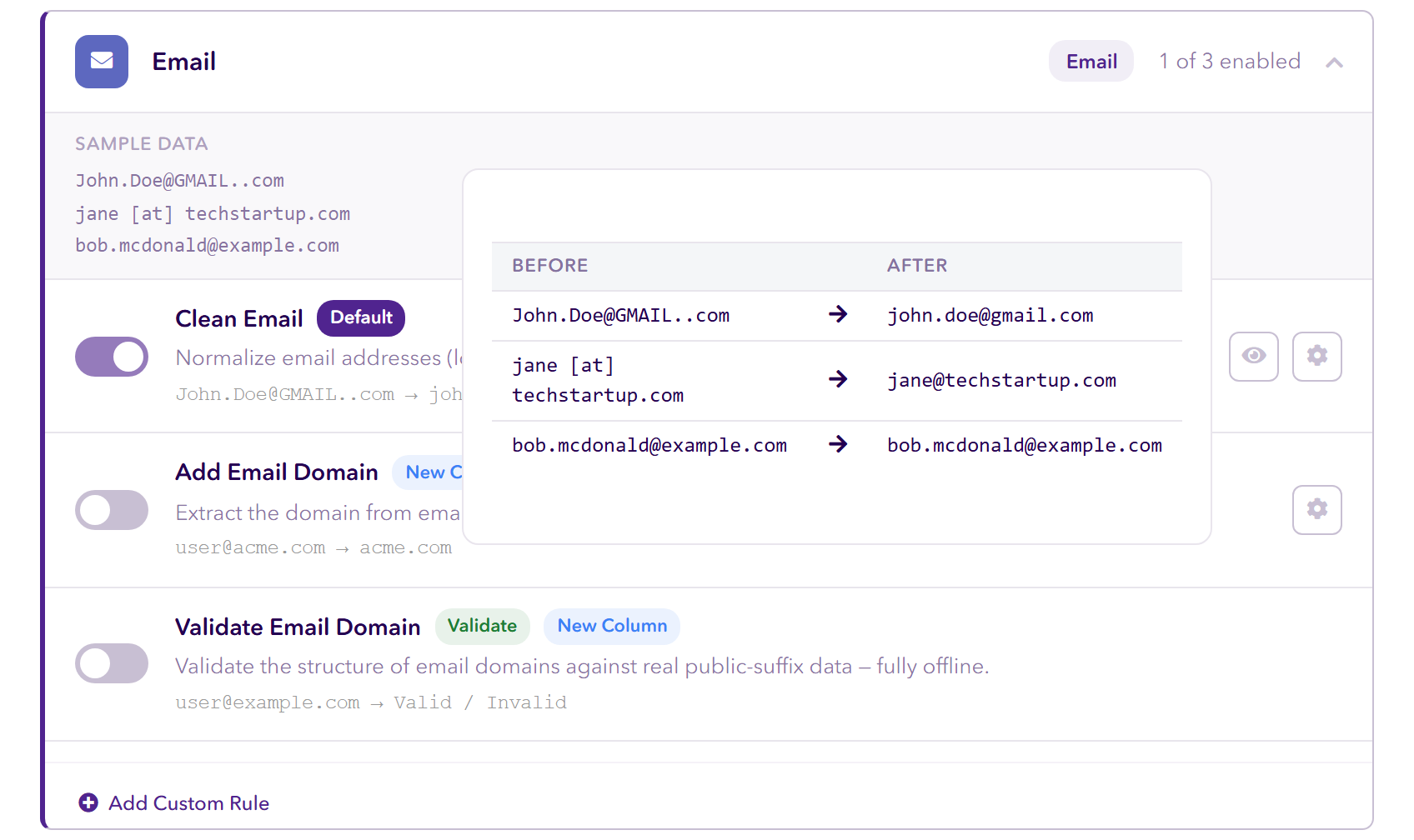
Quick Clean applies the recommended operations to every column it recognizes in one click; Guided Mode lets you choose them field by field and set the formats you want, such as how dates and phone numbers are written. Optional format checks cover phone numbers, email domains and VAT numbers. Whatever can't be fixed is flagged in an error column for that field, and a 0–100 quality score sums up the whole file. Duplicates are flagged with a Dupe ID for you to review and never deleted or merged in your records — with a free account, a deduplicated list with one row per group is a separate export you choose — and 20 fill-in rules complete empty cells from data already in the file.
Your file is processed on Cleansable's servers in Oregon (US) and deleted 24 hours after the run; its rows are never written to our database, logs, error reports or backups, and every run comes with a privacy receipt. The one check that reaches outside our servers, whether an email's domain exists, is off unless you turn on External Lookups, and even then only the domain is looked up. Cleansable is free during beta for files up to 10 MB and 25,000 rows per dataset, with no credit card.
Keep reading
- How to prepare a list for a CRM import: the fixes that matter most before a list becomes CRM records.
- How to clean an email list before a campaign: catch format problems and typos before you send.
- Frequently asked questions: how Cleansable finds duplicates, where your data is processed, and what's free during beta.
- Security & privacy: what happens to your file, and what we keep.
More guides and explainers: Resources.